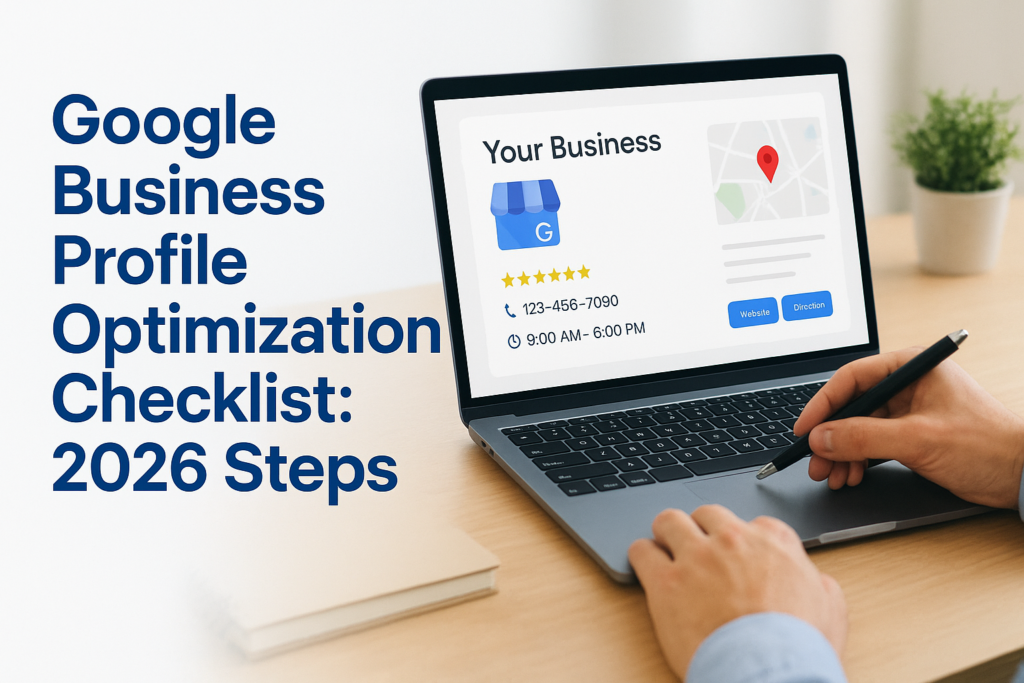
Your storefront on Google Maps matters just as much as your physical one, sometimes more. When a potential customer in Dubai or Abu Dhabi searches for what you sell, your Google Business Profile is often the first thing they see. A complete, well-optimized profile can be the difference between a phone call and a scroll past. That’s exactly why having a Google Business Profile optimization checklist matters: it turns a passive listing into an active driver of local traffic and revenue.
At Natural Pyrite UAE, we built our local presence from the ground up. Every order we fulfill across the Emirates, from handcrafted pyrite decor to our signature bracelets, starts with someone finding us online. We’ve tested, adjusted, and refined our own Google Business Profile through real trial and error, not theory. That hands-on experience with local search in the UAE market is what shaped this guide.
Below, you’ll find a step-by-step checklist covering every section of your profile, from initial setup and verification to photos, reviews, posts, and performance tracking. Each step includes specific actions you can take right now, whether you’re launching a brand-new profile or auditing one that’s been sitting untouched for months. The goal is simple: help you rank higher on Google Maps, show up for the right searches, and convert more of that visibility into actual customers.
Who should use a Google Business Profile in 2026
If your business serves customers in a specific geographic area, a Google Business Profile is one of the most effective free tools available to you. Whether you run a boutique in Jumeirah, a consultancy in DIFC, or an e-commerce brand delivering across the Emirates, your local customers are actively searching for what you offer right now. A well-maintained profile puts you in front of them at exactly the right moment, before they ever reach your website.
The short answer is that almost every business with a local or regional presence should have one. But the more useful answer is knowing how your specific business type benefits and what you should prioritize on your own google business profile optimization checklist.
Brick-and-mortar and service-area businesses
If you have a physical storefront, office, or showroom, your Google Business Profile acts as a live directory listing that also appears on Google Maps. Customers use it to check your hours, get directions, read reviews, and call you directly. Without a complete profile, you lose that foot traffic to competitors who show up in the results instead.
Service-area businesses work the same way. If you deliver products or provide services across Dubai, Abu Dhabi, or the wider UAE without requiring customers to visit a location, you can set a defined service area on your profile. This keeps you visible in local searches without publishing a home or private address.
A service-area business with no Google Business Profile is effectively invisible to anyone searching "near me" or filtering results by location on Google Maps.
E-commerce brands with local delivery
Many e-commerce businesses assume a Google Business Profile only applies to physical retailers. That assumption costs them real local visibility. If your brand ships within a defined region and you can verify a business address, you qualify for a profile and should actively use one.
For a brand like Natural Pyrite UAE, the profile bridges the gap between online discovery and local trust. A customer in Dubai searching for decorative stones or handcrafted pyrite pieces sees a verified, reviewed, and photo-rich listing before they ever land on the website. That first impression carries significant weight in a competitive luxury market.
Professionals and personal brands
Freelancers, consultants, coaches, and independent professionals also benefit from maintaining a profile. If you meet clients in person, work from a defined location, or serve a specific city or district, a verified business profile adds credibility that a standalone website cannot match alone. Potential clients can see your reviews, response habits, and service area before they reach out.
Solo professionals operating in competitive markets like legal consulting, financial advisory, or luxury real estate in the UAE face intense local search competition. Appearing in the local pack on Google gives you a visible edge over professionals who rely only on referrals or social media presence. A complete, active profile signals legitimacy to both the algorithm and the client who is evaluating you for the first time.
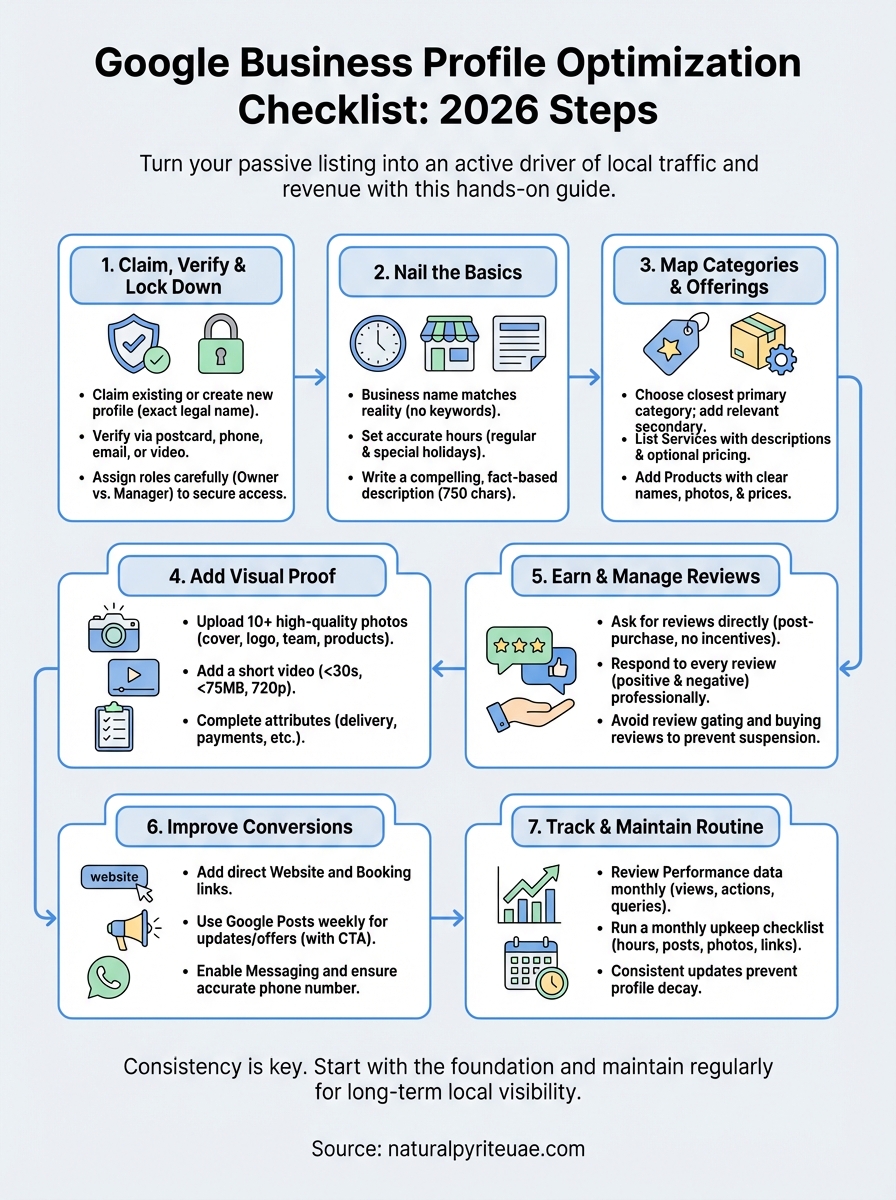
Step 1. Claim, verify, and lock down access
Before any optimization work makes sense, you need to own your listing and confirm Google knows you’re the legitimate business behind it. Skipping this step means someone else, including a random user or a former employee, could already control what appears when customers search for you. Start here, and treat it as the foundation of your entire google business profile optimization checklist.
Find or create your profile
Go to Google Business Profile and search for your business name. Google may have auto-generated a listing based on data it pulled from directories, maps, or your website. If a listing exists, claim it rather than creating a duplicate. Duplicate profiles split your reviews and confuse the algorithm, which directly hurts your local ranking.
If no listing exists, select "Add your business to Google" and follow the setup flow. Enter your exact legal business name as it appears on your registration documents. Inconsistencies between your profile name and your official records can trigger verification issues later.
Never create a second profile for the same business location. Duplicate listings are one of the fastest ways to lose ground in local search results.
Verify your listing
Google requires you to verify your business before your profile goes fully live and visible. Your available verification methods depend on your business type and location, but the most common options are:
- Postcard by mail: Google sends a code to your registered address (typically arrives within 5-14 days in the UAE).
- Phone or email verification: Available for some business types if your contact information matches Google’s records.
- Video verification: Increasingly common; you record a short walkthrough of your location, signage, and equipment.
Complete verification as quickly as possible. An unverified profile has limited features and reduced visibility in Maps results.
Protect access with the right user roles
Once your profile is verified, add a secondary owner immediately. If you ever lose access to the primary Google account, a backup owner lets you recover the profile without going through a lengthy reinstatement process with Google support.
Assign roles carefully. Use "Owner" only for yourself or a trusted business partner, and give staff members the "Manager" role, which limits what they can delete or permanently change.
Step 2. Nail the basics Google ranks and customers trust
The foundation of your google business profile optimization checklist sits in the fields most businesses rush through or fill in carelessly. Google uses these core details to determine whether your listing is relevant for a given search, and customers use them to decide whether to trust you. Getting the basics right is not glamorous work, but it directly affects your local ranking and conversion rate.
Write a business name that matches reality
Your business name on Google must match the name you use in the real world, on your signage, invoices, and website. Adding keywords to your name, like "Best Pyrite Decor Dubai," violates Google’s guidelines and risks suspension. Keep it clean and consistent.
Keyword-stuffing your business name is one of the leading causes of profile suspension. Google’s guidelines on representing your business are explicit on this point.
Set accurate hours and keep them updated
Incorrect hours are one of the most common reasons customers leave negative reviews. If someone drives to your location or contacts you based on hours that are wrong, you lose both the sale and the trust. Update your hours every time they change, and use Google’s "Special hours" feature for public holidays in the UAE.

Here is a quick reference for the fields you need to confirm:
| Field | What to check |
|---|---|
| Regular hours | Match your actual open and close times |
| Special hours | Cover UAE public holidays and Ramadan schedules |
| "Open now" status | Verify it reflects your actual availability |
| Temporarily closed | Use this instead of deleting the profile during breaks |
Write a description that earns clicks
Your business description gives you 750 characters to communicate what you do and why someone should choose you. Lead with your most important offering, mention your location or service area, and include one natural reference to your core product or service category. Skip the generic phrases and write something a real customer would find useful.
A practical template to follow:
[Business name] offers [core product/service] in [location/service area].
We [what makes you different], serving [target customer] since [year].
Contact us for [specific action: orders, consultations, visits].
Fill it in with specific, factual details about your business rather than vague claims about quality or excellence.
Step 3. Pick categories and map your services and products
Your category selection is one of the most direct ranking signals Google uses to match your profile to relevant searches. Most businesses pick a primary category and stop there, which leaves significant visibility on the table. The categories you choose tell Google what type of business you are, and your services and products section tells it exactly what you offer within that category. Both sections feed into how your listing appears in local search results.
Choose your primary and secondary categories
Your primary category carries the most weight in Google’s algorithm, so it needs to match your core business function as closely as possible. If you sell decorative stones and handcrafted home decor, pick the category that most accurately reflects that, not the broadest one that feels safe. Google provides a fixed list of categories, so search within the interface and select the closest available match before settling on anything.
Selecting a vague or overly broad primary category reduces your relevance for specific searches and lowers your chances of appearing in the local pack.
Secondary categories let you capture additional search intent. A business like Natural Pyrite UAE can use its primary category for decorative goods and add secondary categories for jewelry or artisan crafts. Add every category that legitimately applies to your business, but skip any that only loosely relate to what you actually offer.
Add your services and products
The services section lets you list specific offerings with names, descriptions, and optional pricing. Fill this out completely. Each service entry is an additional opportunity for your listing to surface in relevant searches. Write descriptions that explain what the service includes, who it is for, and what outcome the customer can expect.
Products work the same way and are especially valuable for e-commerce brands with local delivery operations. Add individual product listings with clear names, photos, and prices where applicable. Use this template for each entry:
Name: [Specific product or service name]
Description: [What it is, who it's for, key detail]
Price: [Fixed price or starting price if variable]
Filling in both sections completely strengthens your overall google business profile optimization checklist and gives Google more content to index against real customer searches.
Step 4. Add proof with photos, videos, and key details
Visual content and factual attributes are where your profile moves from basic information to genuine proof. Customers searching in Dubai or Abu Dhabi compare multiple listings before making a decision, and the profile with clear, high-quality photos and complete details consistently earns more clicks and calls than one with placeholder images or empty fields. This step is where your google business profile optimization checklist starts working visually for you.
Upload photos that show what you actually offer
Your photos need to show real products, real spaces, and real people connected to your business. Avoid stock images entirely; Google can detect low-engagement photos, and customers recognize generic imagery immediately. Upload a minimum of ten photos covering your storefront or workspace, your products, your team, and any packaging or delivery process.

Profiles with more than ten photos receive significantly more views and direction requests than those with fewer, according to Google’s own business resources.
Use this checklist for your photo uploads:
- Cover photo: Front-facing, well-lit, represents your brand clearly
- Logo: High resolution, matches your website and social channels
- Product or service photos: Multiple angles, natural lighting where possible
- Interior or workspace: Shows the environment customers can expect
- Team photos: Builds personal trust with potential customers
Add a short video
Video content on your profile holds visitor attention longer and gives you a visible edge in markets where most businesses upload only static images. Keep your video under 30 seconds and focus on showing your products, workspace, or a simple demonstration of your craft.
Your video file must be under 75 MB, at least 720p resolution, and no longer than 30 seconds to meet Google’s upload specifications.
Complete the attributes and additional details
Attributes are the small checkboxes and data fields that appear beneath your main profile information. They tell customers things like whether you offer online delivery, accept specific payment methods, or serve a particular clientele. Fill in every attribute that accurately reflects your business.
Use this template to audit your attributes section:
Delivery available: Yes / No
Online orders accepted: Yes / No
Payment methods: [list accepted methods]
Languages spoken: [list languages]
Accessibility features: Yes / No
These details feed directly into filtered local searches, where customers narrow results by features that matter specifically to them.
Step 5. Earn and manage reviews without policy risks
Reviews are one of the strongest local ranking signals Google uses, and they directly influence whether a customer chooses your business over a competitor. A steady stream of genuine, recent reviews tells Google your business is active and trustworthy. But the way you earn and respond to reviews determines whether this part of your google business profile optimization checklist builds you up or puts your profile at risk.
Ask for reviews the right way
You can and should ask customers to leave a review, but the request needs to be direct and unpressured. Send a follow-up message after a completed order or service, include a short sentence with your review link, and let the customer decide what to write. Never offer incentives, gifts, or discounts in exchange for a positive review. That violates Google’s review policies and risks removing your reviews or suspending your profile entirely.
Use this template for a post-purchase review request:
Hi [Name], thank you for your recent order.
If you have a moment, we'd appreciate hearing about your experience.
You can leave a review here: [Your Google review link]
Keep it short, personal, and free of any conditions about what the customer should write.
Respond to every review
Responding to reviews signals to Google that your business is engaged and attentive, and it shows potential customers how you handle real feedback. Reply to positive reviews with a specific, brief acknowledgment that references what the customer mentioned. Avoid copying the same response repeatedly; unique replies carry more credibility with both Google and future readers.
Responding to negative reviews professionally is one of the most visible trust signals on your entire profile.
For critical reviews, acknowledge the concern, offer a resolution, and move the conversation offline if necessary. Never argue publicly or dismiss a complaint.
Avoid the practices that get profiles suspended
Review gating (only asking satisfied customers to leave reviews) and buying reviews from third-party services are both violations that can result in permanent profile removal. Stick to organic outreach, verified customer contacts only, and requests sent after a completed transaction.
Step 6. Improve conversions with links, posts, and actions
Your Google Business Profile does not just help people find you. It also gives you direct tools to convert that discovery into action. Completing this step in your google business profile optimization checklist means you stop leaving decisions to chance and start guiding visitors toward a specific next step.
Add your website and booking links
Your profile includes a dedicated website field that every visitor sees before clicking away to search further. Fill it in with the exact URL you want traffic sent to, whether that is your homepage, a specific product page, or a booking form. If you offer appointments or consultations, add a booking link using Google’s integrated appointment feature or a third-party scheduling tool that Google supports.
A profile without a clear website link loses a measurable percentage of visitors who will not take the extra step of searching for your site independently.
Use Google Posts to stay visible
Google Posts appear directly on your profile and let you share updates, offers, and announcements that show up in search results. Write a new post at least once every seven days to signal to Google that your profile is actively maintained. Each post supports a headline, a short description, a photo, and a call-to-action button.

Use this template for a standard Google Post:
Headline: [Short, specific, under 60 characters]
Body: [2-3 sentences describing the offer, update, or product]
Photo: [Product image or workspace photo, min 400x300px]
Button: [Choose: Order online / Call now / Learn more / Get offer]
Keep your posts focused on one message per entry. Mixing multiple offers in a single post dilutes the call-to-action and reduces click-through rates.
Set up messaging and call buttons
The messaging feature lets customers contact you directly from your profile without finding your phone number or navigating to your website. Enable it and set a response time you can realistically maintain. If a customer sends a message and receives no reply within 24 hours, Google may disable the feature on your profile automatically.
Check that your primary phone number is accurate and formatted correctly for UAE customers, including the country code where applicable.
Step 7. Track performance and run a simple upkeep routine
Optimization is not a one-time task. Your Google Business Profile collects real performance data every day, and that data tells you exactly where your profile is working and where it is losing people. The final step in your google business profile optimization checklist is building a habit of checking that data and acting on it before small gaps turn into bigger visibility problems.
Read your performance data inside Google Business Profile
Google provides a built-in analytics dashboard inside your profile called Performance. You can access it directly from your profile management panel at business.google.com. The data covers how customers found your profile, what actions they took, and which search queries triggered your listing to appear.
Check your Performance data at least once a month. A sudden drop in search views or direction requests often signals a profile issue that needs attention before it compounds.
Focus on these four metrics each time you review:
| Metric | What it tells you |
|---|---|
| Search views | How often your profile appeared in direct or discovery searches |
| Maps views | How many people found you specifically on Google Maps |
| Customer actions | Calls, website clicks, direction requests, and messages |
| Search queries | The actual terms people used to find your listing |
Run a monthly upkeep routine
Consistent maintenance prevents the slow decay that hits profiles left untouched for months. Once a month, run through a short checklist to keep your listing accurate and active. Use this template and complete each item before moving to the next:
Monthly upkeep checklist:
[ ] Confirm hours are current, including upcoming holidays
[ ] Add at least one new Google Post
[ ] Upload one new photo
[ ] Respond to any unanswered reviews
[ ] Check that website and booking links still work
[ ] Review your top search queries for new content ideas
[ ] Confirm your service area or address is still accurate
This routine takes under 30 minutes when done consistently and prevents the kind of profile drift that forces a full audit every few months. Small, regular updates compound over time into a stronger local ranking and a more trustworthy first impression for every new customer who finds you.
Next steps
You now have a complete google business profile optimization checklist that covers every section of your listing, from initial verification through to monthly performance reviews. The work is straightforward, but it only pays off if you act on it consistently rather than treat it as a one-time setup task. Start at Step 1 today, move through each section in order, and schedule your first monthly upkeep check before you close the tab.
Local search visibility compounds over time. Every accurate detail, every photo you upload, and every review you earn builds a stronger signal for Google and a more trustworthy impression for every customer who finds you. The businesses that dominate Google Maps in Dubai and Abu Dhabi are not there by chance. They show up because they maintain their profiles with intention.
If you are building something worth finding, start with the right foundation. Explore our handcrafted pyrite collection in the UAE and see what intentional presence looks like in practice.