
Rich results can make the difference between a click and a scroll-past. When your products compete for attention in search results, schema markup best practices determine whether potential customers see star ratings, prices, and availability, or just a plain blue link. For e-commerce businesses selling high-value items, that visibility directly impacts revenue and brand perception.
At Natural Pyrite UAE, we’ve implemented structured data across our product pages to ensure our handcrafted pyrite pieces display properly in search results. Our experience optimizing schema for luxury goods has taught us what works, what breaks, and what Google actually rewards with enhanced search features. The technical details matter, especially when you’re competing against larger retailers with deeper pockets and bigger teams.
This guide covers everything you need to implement structured data correctly in 2026, from selecting the right schema types to testing and maintaining your markup as search engines evolve. Whether you’re marking up product pages, articles, or local business information, you’ll find actionable steps that align with current Google standards and the emerging requirements of AI-powered search.
What schema markup is and why it matters in 2026
Schema markup is structured data code that you add to your website’s HTML to help search engines understand the specific meaning of your content. When you mark up a product page, you’re telling Google that "$450" is a price, "4.8 stars" is a rating, and "In Stock" is availability, rather than forcing algorithms to guess from surrounding text. This explicit labeling system uses standardized vocabulary from Schema.org that all major search engines recognize and process.
How structured data communicates with search engines
You place schema markup directly in your page code using one of three formats: JSON-LD, Microdata, or RDFa. Google recommends JSON-LD because it keeps the structured data separate from your visible HTML, making it easier to implement and maintain. The code sits in a script tag and describes the entities on your page using property-value pairs that search engines can parse instantly.
When a search engine crawler visits your page, it reads both your visible content and your schema markup. The structured data confirms what the page contains and provides additional context that isn’t always clear from text alone. For a product like our Money Magnet Pyrite Bracelet, schema tells Google the exact price, currency, material, dimensions, and review score without requiring the algorithm to interpret natural language descriptions.
Why rich results drive measurable performance gains
Pages with proper schema markup earn rich results in search listings, which display extra information like star ratings, pricing, availability, images, and other details directly in the search results. These enhanced listings occupy more screen space and provide users with the information they need before they click. Research from Google shows that rich results consistently achieve higher click-through rates than standard blue links, sometimes doubling the percentage of searchers who visit your site.
Rich results transform a standard search listing into a preview that answers key questions before the click, which paradoxically increases clicks because users trust they’ll find what they need on your site.
For businesses selling premium products in competitive markets like Dubai and Abu Dhabi, that visibility difference matters. When someone searches for "pyrite bracelet Dubai," you want your listing to show the 4.9-star rating, the AED price, and same-day delivery availability right in the search results. Competitors without proper schema show up as plain text links that blend into the page.
The AI search factor in 2026
AI-powered search features like Google’s Search Generative Experience and conversational search tools rely heavily on structured data to generate responses. When an AI needs to recommend products, compare options, or answer specific questions, it pulls from pages with clear schema markup because that data is machine-readable and reliable. Websites following schema markup best practices get cited in AI-generated answers and recommendation panels more frequently than sites with unstructured content.
Search behavior has shifted toward more specific, conversational queries. Users ask "What’s the best natural pyrite bracelet under 500 dirhams with same-day delivery" instead of typing "pyrite bracelet." Your schema markup needs to include all the relevant properties and values that AI systems use to match queries to products. Missing fields like shipping details, material specifications, or review counts means your products won’t appear in filtered results or AI recommendations, regardless of how well-written your product descriptions are.
Step 1. Audit pages and pick the right schema
You need to start by mapping every page type on your site to the correct schema type before you write a single line of code. This prevents the common mistake of implementing generic schema across your entire site when different pages require different structured data formats. A product page needs Product schema, your about page needs Organization schema, and a blog post needs Article schema, yet many sites default to one type and wonder why Google ignores their markup.
Inventory your content types and business goals
Begin by creating a spreadsheet that lists every template type on your website. Include your homepage, product pages, category pages, blog posts, contact pages, and any landing pages you maintain. For each template, note the primary content type and what you want to appear in search results. At Natural Pyrite UAE, we identified five key templates: product detail pages, collection pages, about page, blog articles, and our homepage.
Your business goals determine which schema properties matter most. If you sell physical products and compete on price and availability, you need complete Product schema with offers, availability, and shipping details. If you’re building authority through content, Article schema with author information and publication dates becomes critical. Document these priorities next to each template in your audit spreadsheet because they’ll guide which optional properties you include later.
The schema types you choose must align with both your content and your competitive advantages, or you’ll waste development time on markup that doesn’t improve your search visibility.
Match schema types to your pages
Reference the official Schema.org type hierarchy to find the most specific schema type that describes each page’s content. Product pages obviously use Product schema, but you need to decide between more general types like Thing or WebPage versus specific types like Article, BlogPosting, or FAQPage. Google’s structured data documentation shows which types trigger rich results, so prioritize those that unlock visual enhancements in search listings.
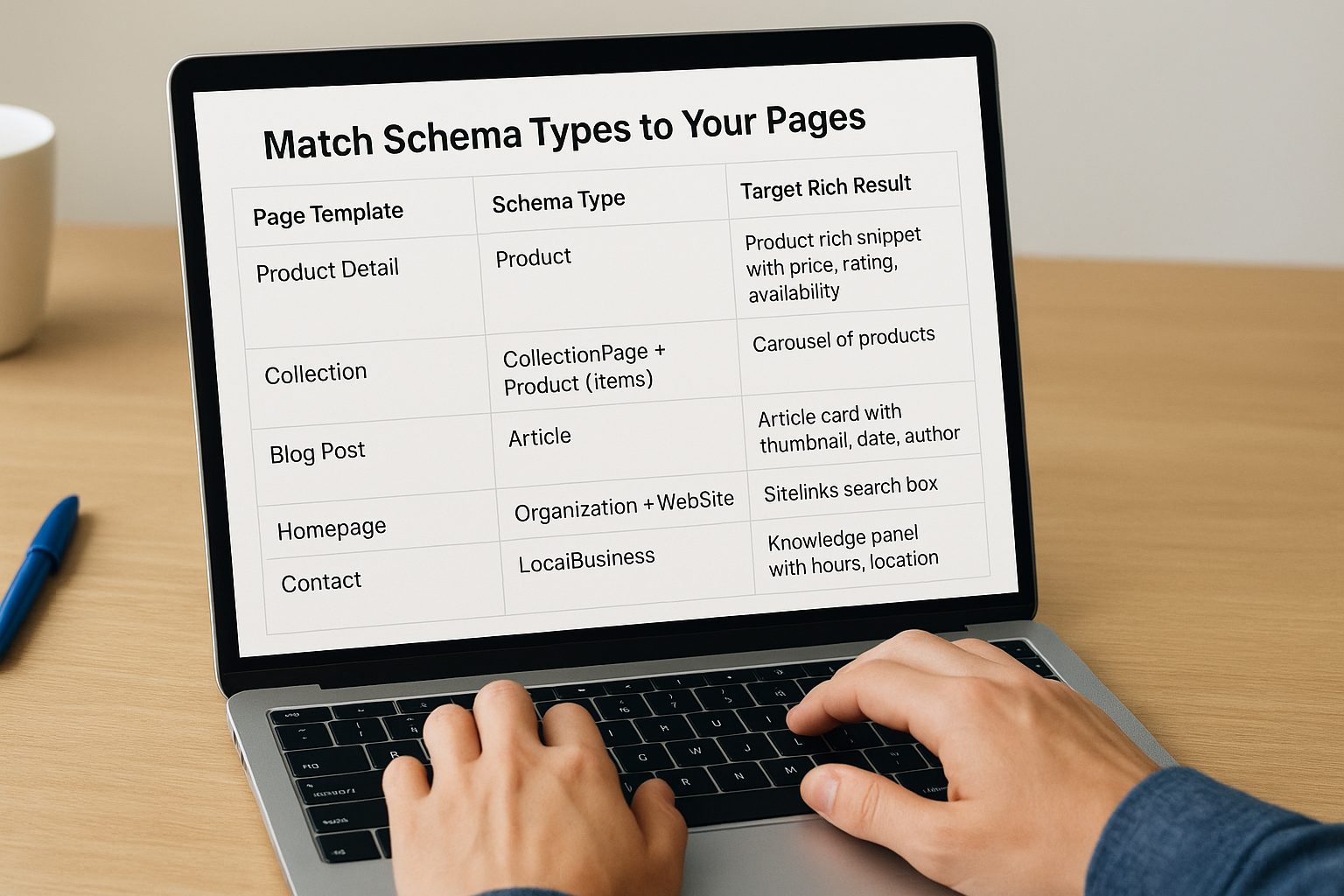
Create a mapping table that connects each template to its schema type and the rich result you’re targeting:
| Page Template | Schema Type | Target Rich Result |
|---|---|---|
| Product Detail | Product | Product rich snippet with price, rating, availability |
| Collection | CollectionPage + Product (items) | Carousel of products |
| Blog Post | Article | Article card with thumbnail, date, author |
| Homepage | Organization + WebSite | Sitelinks search box |
| Contact | LocalBusiness | Knowledge panel with hours, location |
This table becomes your implementation roadmap and ensures you’re following schema markup best practices by selecting types that match both your content and Google’s documented support for rich results.
Step 2. Build JSON-LD that matches the page
JSON-LD separates your structured data from your HTML, which makes it easier to implement and maintain than inline formats like Microdata. You place the code in a script tag within your page’s head or body section, and Google reads it independently from your visible content. This approach lets you update schema without touching your frontend design and allows multiple schema blocks on the same page when needed.
Start with the basic JSON-LD wrapper
Every JSON-LD block begins with opening script tags that declare the format and closes with matching tags. Inside, you specify the context (always "https://schema.org") and the type of schema you’re implementing. This structure tells search engines that your code follows Schema.org vocabulary and defines what entity you’re describing.
Here’s the basic template:
<script type="application/ld+json">
{
  "@context": "https://schema.org",
  "@type": "Product",
  "name": "Your product or content name",
  "description": "Brief description matching your page"
}
</script>
You nest all your property-value pairs inside the curly braces after the type declaration. Each property must match Schema.org’s documented properties for your chosen type, and values should reflect the actual content visible on your page.
Map schema properties to visible page elements
Your schema markup must describe what users actually see on the page, not aspirational content or marketing claims. When you mark up a product page for our Seven Running Horses Pyrite Frame, every property in the JSON-LD needs to match information displayed in the HTML. If your page shows "AED 2,800," your schema price must be 2800 with currency AED. Mismatches between visible content and structured data violate schema markup best practices and can trigger warnings in Google Search Console.
Create a direct mapping between page elements and schema properties before you write code. Note where the product name appears in your H1, where the price displays, and where descriptions and specifications live in the HTML. This ensures your JSON-LD accurately represents the page rather than containing information that exists only in the markup.
Schema markup amplifies your existing content rather than replacing it, which means every structured data value must have a corresponding visible element somewhere on the page.
<script type="application/ld+json">
{
  "@context": "https://schema.org",
  "@type": "Product",
  "name": "Money Magnet Pyrite Bracelet",
  "description": "Handcrafted natural pyrite bracelet designed for daily wear",
  "image": "https://naturalpyriteuae.com/images/bracelet.jpg",
  "sku": "NPU-BRACELET-001",
  "brand": {
    "@type": "Brand",
    "name": "Natural Pyrite UAE"
  }
}
</script>
This example shows core required properties for Product schema. Your actual implementation needs additional fields for offers, ratings, and availability, which we’ll cover in the next step.
Step 3. Add rich result fields and nesting
Rich results require specific property combinations that go beyond basic schema markup. Google documents which fields you must include and which properties increase your chances of earning enhanced listings. Your core Product schema becomes eligible for product rich snippets only when you add complete offer information, aggregate ratings, and availability status. Missing even one critical property means your markup gets ignored, regardless of how perfectly you structured the basic fields.
Include required and recommended properties for rich results
Google’s Rich Results Test shows exactly which properties unlock each rich result type. For Product schema, you need name, image, and a valid offer object containing price, priceCurrency, and availability at minimum. Adding aggregateRating with ratingValue and reviewCount significantly improves your chances of displaying star ratings directly in search results.
Review Google’s structured data documentation for your schema type and implement every required field plus all recommended properties that apply to your content. Optional fields become valuable when they differentiate your products from competitors or answer common user questions. Shipping details, return policies, and material specifications all contribute to richer search appearances.
{
  "@context": "https://schema.org",
  "@type": "Product",
  "name": "Money Magnet Pyrite Bracelet",
  "offers": {
    "@type": "Offer",
    "price": "450",
    "priceCurrency": "AED",
    "availability": "https://schema.org/InStock",
    "seller": {
      "@type": "Organization",
      "name": "Natural Pyrite UAE"
    }
  },
  "aggregateRating": {
    "@type": "AggregateRating",
    "ratingValue": "4.9",
    "reviewCount": "127"
  }
}
Nest related entities properly
Schema markup best practices require proper nesting of related objects rather than flat property lists. Your offers property shouldn’t contain loose values but needs a complete Offer object with its own type declaration. Brand, manufacturer, and seller properties each nest their own Organization or Brand objects. This hierarchical structure matches how search engines understand entity relationships and prevents validation errors.

Nesting tells Google that your product isn’t just associated with a brand name string but connects to an actual brand entity with its own properties and identity.
You create nested objects by opening new curly braces and declaring a type for each related entity. The seller in your offers should include the organization name and ideally a URL linking to your Organization schema on your homepage. Each nested level needs proper comma placement and bracket closure to maintain valid JSON syntax.
"brand": {
  "@type": "Brand",
  "name": "Natural Pyrite UAE"
},
"material": "Natural Pyrite",
"itemCondition": "https://schema.org/NewCondition"
Review your complete JSON-LD block for balanced brackets and proper comma usage between properties. Syntax errors break the entire markup block, preventing Google from reading any of your structured data.
Step 4. Implement at scale in your CMS
Manually adding JSON-LD to individual pages creates maintenance nightmares and inconsistency across your site. You need a template-based approach that generates schema markup dynamically from your CMS data, ensuring every product page, blog post, or collection follows schema markup best practices without requiring a developer to touch each URL. Your CMS already stores all the information search engines need, so your implementation should pull values from existing fields rather than duplicating data in hard-coded markup.
Set up dynamic schema templates
Your CMS platform (WordPress, Shopify, custom builds) allows you to create template files that generate markup for entire page types at once. Instead of writing specific JSON-LD for each product, you build one master template that pulls product name, price, images, and other properties from your database fields and outputs properly formatted schema automatically. This approach ensures consistency across hundreds or thousands of pages while letting you update schema logic in one location.
Create a template file that uses your CMS’s templating syntax to insert dynamic values:
<script type="application/ld+json">
{
  "@context": "https://schema.org",
  "@type": "Product",
  "name": "{{ product.title }}",
  "description": "{{ product.description | truncate: 200 }}",
  "image": "{{ product.featured_image | img_url: 'large' }}",
  "sku": "{{ product.sku }}",
  "offers": {
    "@type": "Offer",
    "price": "{{ product.price }}",
    "priceCurrency": "{{ shop.currency }}",
    "availability": "{% if product.available %}https://schema.org/InStock{% else %}https://schema.org/OutOfStock{% endif %}"
  }
}
</script>
This example uses Shopify’s Liquid syntax, but every CMS provides similar variable insertion capabilities through their template engines. Your template automatically adapts to each product’s specific data without manual updates.
Dynamic templates transform schema implementation from a per-page task into a site-wide system that scales effortlessly as you add new products or content.
Map CMS fields to schema properties
Document which database fields or custom fields in your CMS correspond to each required schema property. Your product table probably stores everything you need, but fields might use different names than Schema.org expects. Price might be stored as "product_price," availability as "stock_status," and ratings as separate review tables. Creating this mapping ensures your developers pull the correct data when building templates.
Build a reference table that connects your CMS structure to schema requirements:
| Schema Property | CMS Field Name | Data Type | Transformation Needed |
|---|---|---|---|
| name | product_title | String | None |
| price | base_price | Decimal | None |
| priceCurrency | store_currency | String | None |
| availability | inventory_count | Integer | Convert to schema.org URL format |
| aggregateRating | reviews.average | Decimal | None |
| reviewCount | reviews.total | Integer | None |
This mapping guides your template development and ensures you’re not missing fields that exist in your CMS but aren’t currently exposed in your schema markup.
Step 5. Test, fix errors, and monitor results
Testing your schema markup before deploying to production catches syntax errors and missing required fields that prevent rich results from appearing. You cannot assume your JSON-LD works correctly just because it doesn’t break your page layout. Search engines silently ignore broken or incomplete schema, which means you might think you’ve implemented structured data while Google sees nothing useful to enhance your search listings. Validation tools expose these problems immediately and show you exactly which properties need fixing.
Run validation tools immediately after implementation
Google’s Rich Results Test parses your markup and confirms whether you qualify for enhanced search features. Paste your page URL or directly input your JSON-LD code, then review the preview panel showing how your listing might appear in search results. The tool flags errors with red indicators and warnings with yellow tags, each linked to specific properties that need attention. You should test every unique template type on your site, not just one example page, because different products or content might expose validation issues that don’t appear on your test cases.
Testing reveals the gap between markup that looks correct and markup that actually triggers rich results, which often comes down to a single missing property or incorrect value format.
Schema.org’s validator provides a second layer of verification by checking your JSON-LD against the official schema specification. This tool catches nesting errors, invalid property names, and type mismatches that might pass Google’s test but violate schema markup best practices. Run both validators on the same pages to ensure your implementation satisfies technical standards and search engine requirements simultaneously.
Fix common errors systematically
Most validation errors fall into predictable categories that you can resolve quickly. Missing required properties trigger the most frequent errors, typically offers details for Product schema or publication dates for Article markup. Add the missing fields to your templates rather than hard-coding fixes on individual pages. Incorrect value formats cause warnings when you use plain text for properties expecting URLs, numbers for fields requiring strings, or the wrong enumeration values from Schema.org’s controlled vocabularies.
Check these common issues during validation:
- Missing offers object with price, currency, and availability
- Incorrect URL formats for image, brand, or availability properties
- Mismatched visible content where schema describes information not on the page
- Broken nesting with unclosed brackets or missing type declarations
- Invalid date formats that don’t follow ISO 8601 standard
Monitor performance in Search Console
Google Search Console’s Enhancements report tracks how many pages have valid structured data, which rich result types you’ve earned, and any errors affecting your implementation. Access this report weekly during the first month after deployment to catch issues before they impact significant numbers of pages. The report groups errors by type and severity, letting you prioritize fixes that affect the most URLs or block your most valuable rich results.
Your rich result impressions appear in the Performance report under the Search Appearance filter. Track clicks and impressions for pages with enhanced listings compared to pages without schema markup to measure the actual click-through rate improvement from your implementation. This data proves whether your structured data investment delivers measurable traffic increases or needs optimization.
Quick wrap-up
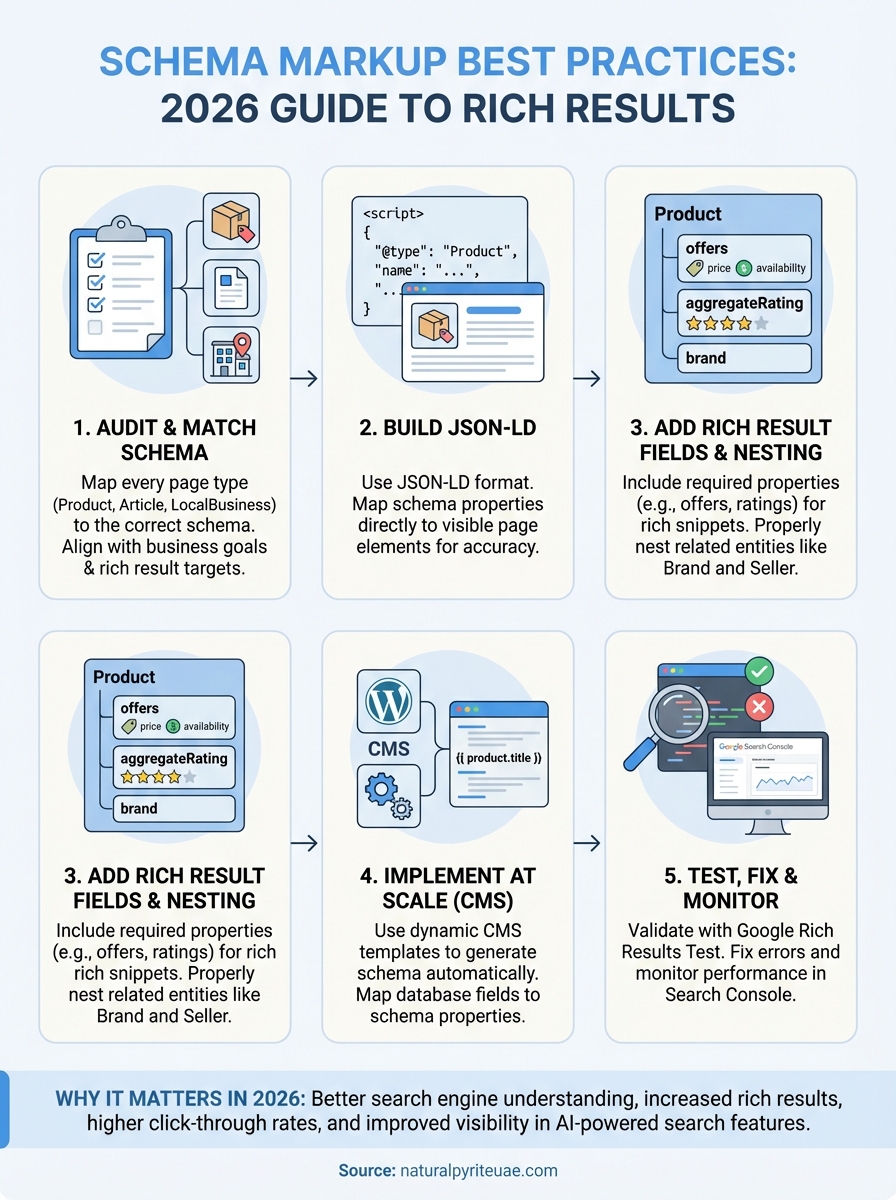
Following schema markup best practices transforms your search visibility from basic text listings to rich results that drive measurable traffic increases. The five-step process covered here (audit your pages, build matched JSON-LD, add rich result fields, implement at scale, and test systematically) creates a foundation that adapts as search engines evolve toward AI-powered features.
Your structured data implementation needs regular maintenance through Search Console monitoring and periodic validation checks. Google updates its rich result requirements, adds new schema types, and changes which properties trigger enhanced listings. Businesses that treat schema as a one-time setup miss opportunities and risk losing rich results when requirements shift.
We’ve applied these exact techniques across our product pages at Natural Pyrite UAE to ensure our handcrafted pieces appear with complete pricing, ratings, and availability in search results. You can see properly implemented Product schema in action by browsing our pyrite collection, where every listing follows the standards outlined in this guide.